
NOTICE
-
No.SubjectDate
-
Notice[Notice] Changes to Official Light Stick Operating Policy2026/08/12
Hello, this is SM ENTERTAINMENT.
We would like to inform you regarding wireless control support for official light sticks.
Starting with concerts held on or after September 1, 2026 (Tue), wireless control support for the NCT and WayV Official Light Stick Ver. 1 will be discontinued.
▶ NCT and WayV Official Light Stick Ver. 1: Support available through August 31, 2026 (Mon)
▶ NCT 127, NCT DREAM, WayV, and NCT WISH Official Light Stick Ver. 2: Exclusive support starting from September 1, 2026 (Tue)We will continue to do our best to provide you with an even more enjoyable concert experience.
Thank you.
-
253[Announcement] DIGITAL STAMP - YESUNG SOLO CONCERT - Unfading Sense in MANILA (Jan 6th, 2024)2024/01/05
Hello.
This is SMTOWN.『YESUNG SOLO CONCERT - Unfading Sense in MANILA』 will be held at the “NEW FRONTIER THEATER” in MANILA on January 6th, 2024.
The Stamp issuing process has changed from META-PASSPORT APP to SMTOWN APP GPS Verification.
You can get the DIGITAL STAMP with the location verification system in the NEW SMTOWN APP.Please refer to the following details if you are attending the 『YESUNG SOLO CONCERT - Unfading Sense in MANILA』.
Thank you.
🕰️ Time & Date information to get the DIGITAL STAMP
- January 6th, 2024 (SAT) 09:00 - 23:50 (PHT)
※ Schedules above are subject to change due to various circumstances.
🖼️ How to get the DIGITAL STAMP in the NEW SMTOWN APP
STEP 1. Update and sign in (Log in) to SMTOWN APP
STEP 2. HOME > Hit ‘PASSPORT’ button
STEP 3. Hit ‘STAMP’ icon at the right bottom in the ‘PASSPORT’ screen.
(Allow access at ‘Settings’ > SMTOWN > Location > ‘Always ALLOW LOCATION ACCESS’)
STEP 4. Click the ‘Location verification’ button and get the Stamp!❗️Guidance
When you receive an error when getting a ‘STAMP’, please check the detail as below.
1. Please check the network status in your mobile device.
If your smartphone data or Wi-Fi network is unstable, then the ‘STAMP’ might not be issued.
2. Please check your location.
Check your location information access in your smartphone, and then check your location within 500m from the venue.📍 Where to get the DIGITAL STAMP
- Within 500m from the venue at the “NEW FRONTIER THEATER” in MANILA
(Please try the Location Verification near the concert hall as possible to avoid any interruptions in collecting STAMP)Update the SMTOWN App first, and get the STAMP at the site!
🔗 DOWNLOAD: https://bit.ly/SMTOWN_APP -
252[Announcement] KWANGYA CLUB - SM ARTIST fan club content ARCHIVE open notice2023/12/29
Hello.
This is from the SM ARTIST OFFICIAL FAN CLUB.This is an announcement concerning the ARTIST content ARCHIVE inside the KWANGYA CLUB – SM ARTIST official fan club community.
All posts (posts, comments) written by the ARTIST and the ARTIST content (pictures, voices, videos) other than the announcements posted by the STAFF on the SM ARTIST official fan club community will be available via the SMTOWN APP from 12 PM of Friday, December 29, 2023 to everyone for free.
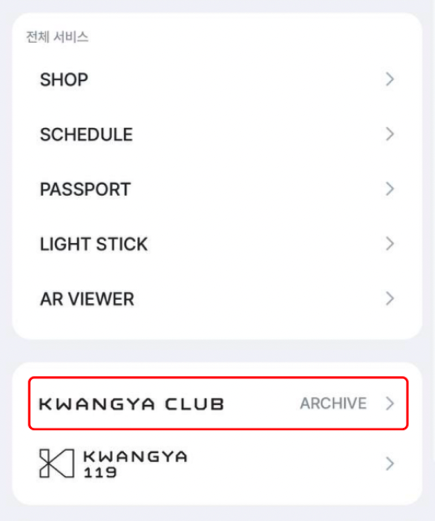
You can check out the ARCHIVE service by clicking on the expand button (≡) on the top-right side of the SMTOWN APP and accessing the KWANGYA CLUB ARCHIVE.
The ARCHIVE service is only available on the lasted version of the SMTOWN APP, so please update your app to the latest version on the app market (Google/Apple) before accessing the service.
🔗 DOWNLOAD: https://bit.ly/SMTOWN_APPThank you.
<Screenshot after clicking the expand button on the SMTOWN APP>
-
251[NOTICE] DIGITAL STAMP - 2023 TVXQ! CONCERT [20&2] (Dec 30~31, 2024)2023/12/29
Hello.
This is SMTOWN.『2023 TVXQ! CONCERT [20&2]』 will be held at the “INSPIRE ARENA” in KOREA on December 30th to 31st, 2023.
The Stamp issuing process has changed from META-PASSPORT APP to SMTOWN APP GPS Verification.
You can get the DIGITAL STAMP with the location verification system in the NEW SMTOWN APP.Please refer to the following details if you are attending the 『2023 TVXQ! CONCERT [20&2]』.
Thank you.
🕰️ Time & Date information to get the DIGITAL STAMP
- December 30th, 2023 (SAT) 09:00 - 23:50 (KST)
- December 31st, 2023 (SUN) 09:00 - 23:50 (KST)
※ Schedules above are subject to change due to various circumstances.
🖼️ How to get the DIGITAL STAMP in the NEW SMTOWN APP
STEP 1. Update and sign in (Log in) to SMTOWN APP
STEP 2. Main > Hit ‘PASSPORT’ button
STEP 3. Hit ‘STAMP’ icon at the right bottom in the ‘PASSPORT’ screen.
(Allow access at ‘Settings’ > SMTOWN > Location > ‘Always ALLOW LOCATION ACCESS’)
STEP 4. Click the ‘Location verification’ button and get the Stamp!✔️ Guidance
When you receive an error when getting a ‘STAMP’, please check the detail as below.
1. Please check the network status in your mobile device.
If your smartphone data or Wi-Fi network is unstable, then the ‘STAMP’ might not be issued.
2. Please check your location.
Check your location information access in your smartphone, and then check your location within 500m from the venue.📍 Where to get the DIGITAL STAMP
- Within 500m from the venue at the INSPIRE ARENA in KOREA
(Please try the Location Verification near the concert hall as possible to avoid any interruptions in collecting STAMP)Update the MUSIC NATION SMTOWN App first, and get the STAMP at the site!
🔗 DOWNLOAD: https://bit.ly/SMTOWN_APP -
250[NOTICE] DIGITAL STAMP - YESUNG SOLO CONCERT - Unfading Sense in TOKYO (Dec 19th, 2023)2023/12/18
Hello.
This is SMTOWN.『YESUNG SOLO CONCERT - Unfading Sense in TOKYO』 will be held at the “Tokyo International Forum Hall A” in TOKYO on December 19th, 2023.
The Stamp issuing process has changed from META-PASSPORT APP to SMTOWN APP GPS Verification.
You can get the DIGITAL STAMP with the location verification system in the NEW SMTOWN APP.Please refer to the following details if you are attending the 『YESUNG SOLO CONCERT - Unfading Sense in TOKYO』.
Thank you.
🕰️ Time & Date information to get the DIGITAL STAMP
- December 19th, 2023 (TUE) 09:00 - 23:50 (JST)
※ Schedules above are subject to change due to various circumstances.
🖼️ How to get the DIGITAL STAMP in the NEW SMTOWN APP
STEP 1. Update and sign in (Log in) to SMTOWN APP
STEP 2. HOME > Hit ‘PASSPORT’ button
STEP 3. Hit ‘STAMP’ icon at the right bottom in the ‘PASSPORT’ screen.
(Allow access at ‘Settings’ > SMTOWN > Location > ‘Always ALLOW LOCATION ACCESS’)
STEP 4. Click the ‘Location verification’ button and get the Stamp!❗️Guidance
When you receive an error when getting a ‘STAMP’, please check the detail as below.
1. Please check the network status in your mobile device.
If your smartphone data or Wi-Fi network is unstable, then the ‘STAMP’ might not be issued.
2. Please check your location.
Check your location information access in your smartphone, and then check your location within 500m from the venue.📍 Where to get the DIGITAL STAMP
- Within 500m from the venue at the “Tokyo International Forum Hall A” in TOKYO
(Please try the Location Verification near the concert hall as possible to avoid any interruptions in collecting STAMP)Update the SMTOWN App first, and get the STAMP at the site!
🔗 DOWNLOAD: https://bit.ly/SMTOWN_APP -
249[NOTICE] DIGITAL STAMP - 2023 RIIZE 100 DAYS PARTY ‘Hello, BRIIZE’ (Dec 17, 2023)2023/12/15
Hello.
This is SMTOWN.『2023 RIIZE 100 DAYS PARTY ‘Hello, BRIIZE’』 will be held at the “DONGHAE ARTS CENTER GRAND THEATER OF KWANGWOON UNIVERSITY” in SEOUL on December 17th, 2023.
The Stamp issuing process has changed from META-PASSPORT APP to SMTOWN APP GPS Verification.
You can get the DIGITAL STAMP with the location verification system in the NEW SMTOWN APP.Please refer to the following details if you are attending the 『2023 RIIZE 100 DAYS PARTY ‘Hello, BRIIZE’ 』.
Thank you.
🕰️ Time & Date information to get the DIGITAL STAMP
- December 17th, 2023 (SUN) 09:00 - 23:50 (KST)
※ Schedules above are subject to change due to various circumstances.
🖼️ How to get the DIGITAL STAMP in the NEW SMTOWN APP
STEP 1. Update and sign in (Log in) to SMTOWN APP
STEP 2. HOME > Hit ‘PASSPORT’ button
STEP 3. Hit ‘STAMP’ icon at the right bottom in the ‘PASSPORT’ screen.
(Allow access at ‘Settings’ > SMTOWN > Location > ‘Always ALLOW LOCATION ACCESS’)
STEP 4. Click the ‘Location verification’ button and get the Stamp!❗️Guidance
When you receive an error when getting a ‘STAMP’, please check the detail as below.
1. Please check the network status in your mobile device.
If your smartphone data or Wi-Fi network is unstable, then the ‘STAMP’ might not be issued.
2. Please check your location.
Check your location information access in your smartphone, and then check your location within 500m from the venue.📍 Where to get the DIGITAL STAMP
- Within 500m from the venue at the “DONGHAE ARTS CENTER OF KWANGWOON UNIVERSITY” in SEOUL
(Please try the Location Verification near the concert hall as possible to avoid any interruptions in collecting STAMP)Update the SMTOWN App first, and get the STAMP at the site!
🔗 DOWNLOAD: https://bit.ly/SMTOWN_APP -
248[NOTICE] DIGITAL STAMP - TAEMIN SOLO CONCERT : METAMORPH (Dec 16~17, 2023)2023/12/15
Hello.
This is SMTOWN.『TAEMIN SOLO CONCERT : METAMORPH』 will be held at the “INSPIRE ARENA” in KOREA on December 16th to 17th, 2023.
The Stamp issuing process has changed from META-PASSPORT APP to SMTOWN APP GPS Verification.
You can get the DIGITAL STAMP with the location verification system in the NEW SMTOWN APP.Please refer to the following details if you are attending the 『TAEMIN SOLO CONCERT : METAMORPH』.
Thank you.
🕰️ Time & Date information to get the DIGITAL STAMP
- December 16th, 2023 (SAT) 09:00 - 23:50 (KST)
- December 17th, 2023 (SUN) 09:00 - 23:50 (KST)
※ Schedules above are subject to change due to various circumstances.
🖼️ How to get the DIGITAL STAMP in the NEW SMTOWN APP
STEP 1. Update and sign in (Log in) to SMTOWN APP
STEP 2. Main > Hit ‘PASSPORT’ button
STEP 3. Hit ‘STAMP’ icon at the right bottom in the ‘PASSPORT’ screen.
(Allow access at ‘Settings’ > SMTOWN > Location > ‘Always ALLOW LOCATION ACCESS’)
STEP 4. Click the ‘Location verification’ button and get the Stamp!✔️ Guidance
When you receive an error when getting a ‘STAMP’, please check the detail as below.
1. Please check the network status in your mobile device.
If your smartphone data or Wi-Fi network is unstable, then the ‘STAMP’ might not be issued.
2. Please check your location.
Check your location information access in your smartphone, and then check your location within 500m from the venue.📍 Where to get the DIGITAL STAMP
- Within 500m from the venue at the INSPIRE ARENA in KOREA
(Please try the Location Verification near the concert hall as possible to avoid any interruptions in collecting STAMP)Update the MUSIC NATION SMTOWN App first, and get the STAMP at the site!
🔗 DOWNLOAD: https://bit.ly/SMTOWN_APP -
247[NOTICE] DIGITAL STAMP - 2023 SUPER JUNIOR-D&E WORLD TOUR FANCON - [Delight Party] in TOKYO (Dec 16th, 2023)2023/12/15
Hello.
This is SMTOWN.『2023 SUPER JUNIOR-D&E WORLD TOUR FANCON - [Delight Party] in TOKYO』 will be held at the “MAKUHARI MESSE EVENT HALL” in TOKYO on December 16th, 2023.
The Stamp issuing process has changed from META-PASSPORT APP to SMTOWN APP GPS Verification.
You can get the DIGITAL STAMP with the location verification system in the NEW SMTOWN APP.Please refer to the following details if you are attending the 『2023 SUPER JUNIOR-D&E WORLD TOUR FANCON - [Delight Party] in TOKYO』.
Thank you.
🕰️ Time & Date information to get the DIGITAL STAMP
- December 16th, 2023 (SAT) 09:00 - 23:50 (JST)
※ Schedules above are subject to change due to various circumstances.
🖼️ How to get the DIGITAL STAMP in the NEW SMTOWN APP
STEP 1. Update and sign in (Log in) to SMTOWN APP
STEP 2. HOME > Hit ‘PASSPORT’ button
STEP 3. Hit ‘STAMP’ icon at the right bottom in the ‘PASSPORT’ screen.
(Allow access at ‘Settings’ > SMTOWN > Location > ‘Always ALLOW LOCATION ACCESS’)
STEP 4. Click the ‘Location verification’ button and get the Stamp!❗️Guidance
When you receive an error when getting a ‘STAMP’, please check the detail as below.
1. Please check the network status in your mobile device.
If your smartphone data or Wi-Fi network is unstable, then the ‘STAMP’ might not be issued.
2. Please check your location.
Check your location information access in your smartphone, and then check your location within 500m from the venue.📍 Where to get the DIGITAL STAMP
- Within 500m from the venue at the “MAKUHARI MESSE EVENT HALL” in TOKYO
(Please try the Location Verification near the concert hall as possible to avoid any interruptions in collecting STAMP)Update the SMTOWN App first, and get the STAMP at the site!
🔗 DOWNLOAD: https://bit.ly/SMTOWN_APP -
246[NOTICE] DIGITAL STAMP - YESUNG SOLO CONCERT - Unfading Sense in BANGKOK (Dec 16th, 2023)2023/12/15
Hello.
This is SMTOWN.『YESUNG SOLO CONCERT - Unfading Sense in BANGKOK』 will be held at the “True icon hall” in BANGKOK on December 16th, 2023.
The Stamp issuing process has changed from META-PASSPORT APP to SMTOWN APP GPS Verification.
You can get the DIGITAL STAMP with the location verification system in the NEW SMTOWN APP.Please refer to the following details if you are attending the 『YESUNG SOLO CONCERT - Unfading Sense in BANGKOK』.
Thank you.
🕰️ Time & Date information to get the DIGITAL STAMP
- December 16th, 2023 (SAT) 09:00 - 23:50 (ICT)
※ Schedules above are subject to change due to various circumstances.
🖼️ How to get the DIGITAL STAMP in the NEW SMTOWN APP
STEP 1. Update and sign in (Log in) to SMTOWN APP
STEP 2. HOME > Hit ‘PASSPORT’ button
STEP 3. Hit ‘STAMP’ icon at the right bottom in the ‘PASSPORT’ screen.
(Allow access at ‘Settings’ > SMTOWN > Location > ‘Always ALLOW LOCATION ACCESS’)
STEP 4. Click the ‘Location verification’ button and get the Stamp!❗️Guidance
When you receive an error when getting a ‘STAMP’, please check the detail as below.
1. Please check the network status in your mobile device.
If your smartphone data or Wi-Fi network is unstable, then the ‘STAMP’ might not be issued.
2. Please check your location.
Check your location information access in your smartphone, and then check your location within 500m from the venue.📍 Where to get the DIGITAL STAMP
- Within 500m from the venue at the “True icon hall” in BANGKOK
(Please try the Location Verification near the concert hall as possible to avoid any interruptions in collecting STAMP)Update the SMTOWN App first, and get the STAMP at the site!
🔗 DOWNLOAD: https://bit.ly/SMTOWN_APP -
245[Notice/Edited] KWANGYA CLUB - SM ARTIST OFFICIAL FANCLUB Subscription Refunds Updated Notice2023/12/12
Hello.
This is SM ARTIST OFFICIAL FANCLUB.
As KWANGYA CLUB has ended its service, refunds have been transferred to all ACE members who requested a refund during the SM ARTIST OFFICIAL FANCLUB ACE refund period from September 1, 2023, to October 31, 2023. If you made a request during the above period but were unable to receive your money due to the reasons below, please refer to the email sent to the email address you entered when making a refund request.
① Unpaid Refund Regarding Korean Bank Accounts
- If you entered a valid account when requesting, but it has been blocked
- If the name you entered when making a request and your account name are different because you changed your name after joining KWANGYA CLUB.
② Unpaid Refund Regarding International Bank Accounts
- If you have entered incorrect information or have not accepted the refund from your account within the given period
③ Undistributed Weverse Shop Cash Refund
- If you have signed up for the Weverse app as a member but not the Weverse Shop app
- If you have entered the wrong email address for your Weverse Shop membership
- If you have switched your Weverse Shop member email address and email address for notices when entering
Please request your refund until December 31 (Sun) if you still have not. Refer to the details mentioned in the “ACE Membership Refund Notice” using the link below.
[ KWANGYA CLUB - SM ARTIST OFFICIAL FANCLUB ACE Membership Refund Notice]
- Who: Fans whose ACE membership remains active as of September 12, 2023 (Tues).
- Refund Period: September 1, 2023 (Fri) 02:00 PM - December 31, 2023 (Sun) 11:59:59 PM (KST) (2-month extension)
- Refund Amount: Remaining active ACE Membership period (in days) X 96 won
※ Your ACE membership fee of 35,000 won has been divided by your active period (365 days). Each remaining day of your ACE membership = 96 won.
- How to: Register for a refund on the [SM ARTIST OFFICIAL FANCLUB ACE Membership Refund] page
※ ACE Membership Refund Register Page Link (Ends at 23:59:59 of December 31, 2023.)
※ Contact for inquiries about ACE membership refunds (Announcement and FAQ available/Ends at 23:59:59 of January 23, 2025.)
→ For further inquiries, please contact ✉️ smfanclub.mail@gmail.com.
Thank you. -
244DIGITAL STAMP ANNOUNCEMENT - 2023 SUPER JUNIOR-D&E WORLD TOUR FANCON - [Delight Party] in DUBAI (Dec 8th, 2023)2023/12/07
Hello.
This is SMTOWN.『2023 SUPER JUNIOR-D&E WORLD TOUR FANCON - [Delight Party] in DUBAI』 will be held at the “THE AGENDA” in DUBAI on December 8th, 2023.
The Stamp issuing process has changed from META-PASSPORT APP to SMTOWN APP GPS Verification.
You can get the DIGITAL STAMP with the location verification system in the NEW SMTOWN APP.Please refer to the following details if you are attending the 『2023 SUPER JUNIOR-D&E WORLD TOUR FANCON - [Delight Party] in DUBAI』.
Thank you.
🕰️ Time & Date information to get the DIGITAL STAMP
- December 8th, 2023 (FRI) 09:00 - 23:50 (GST)
※ Schedules above are subject to change due to various circumstances.
🖼️ How to get the DIGITAL STAMP in the NEW SMTOWN APP
STEP 1. Update and sign in (Log in) to SMTOWN APP
STEP 2. Main > Hit ‘PASSPORT’ button
STEP 3. Hit ‘STAMP’ icon at the right bottom in the ‘PASSPORT’ screen.
(Allow access at ‘Settings’ > SMTOWN > Location > ‘Always ALLOW LOCATION ACCESS’)
STEP 4. Click the ‘Location verification’ button and get the Stamp!✔️ Guidance
If you receive an error when getting a ‘STAMP’, please check the detail as below.
1. Please check the network status in your mobile device.
If your mobile data or Wi-Fi network is unstable, then the ‘STAMP’ might not be issued.
2. Please check your location.
Check your location information access in your smartphone, and then check your location within 500m from the venue.📍 Where to get the DIGITAL STAMP
- Within 500m from the venue at the “THE AGENDA” in DUBAI
(Please try the Location Verification near the concert hall as possible to avoid any interruptions in collecting STAMP)Update the MUSIC NATION SMTOWN App first, and get the STAMP at the site!
🔗 DOWNLOAD: https://bit.ly/NEWSMTOWNAPP